alexa

Player created by Inbound Now - Social Media Tools.

Monday, May 28, 2012

3 Hacks to speed up Firefox Drastically

Firefox has been the most downloaded internet browser for almost 5 years now. It is fast, flexible and secure moreover it also allows you to indulge yourself to a few millions of plugins that it offers.
If you landed here looking for tricks to speed up your Firefox, Bingo !! You are in the right place. Trying out the below given tweaks will make your experience with Firefox even greater.

Reduce the amount of Memory Firefox uses for it’s cache

1. Open up your browser (Firefox obviously) and type “about:config” in the address bar.
Once again click the “I’ll be careful I Promise” warning button to open a long list of configurable preferences.

2. Find “browser.sessionhistory.max_total_viewer

3. Set it’s value to 0(Zero)

Reduce Memory usage by 10 times when Firefox is minimized

Normally Firefox consume a huge amount of the RAM memory even when it is minimised. Use these tweaks to reduce memory usage by nearly 10 times when you minimise Firefox.
1. Open up your browser again and type “about:config” in the address bar.

Once again click the “I’ll be careful I Promise” warning button to open a long list of configurable preferences.

2. Right Click within the page and select New>Boolean.

3. Type the following in the box will opens up config.trim_on_minimize and press Enter.

4. Now click on true and after closing restart the browser.


Increase your RAM's ability to accommodate more packet transfer


1.   Open up your browser again and type “about:config” in the address bar.Once again click the “I’ll be careful I Promise” warning button to open a long list of configurable preferences.

2.   In the same config page, scroll down to the line that says network.http.pipelining . Double click on it to set it to "true".

3.   Next, we will increase the maximum pipeline requests to 100. Find the line that says network.http.pipelining.maxrequests. Double click on it, and a dialog box will pop up. Change the setting from 4 to 100.

4.   Next you just need to close your browser and reopen it. That's all, and it will immidiately boost your speed by 30-40%.
0 comments
Read More

Friday, May 18, 2012

How to Create your Own Virus using Virus Maker

Many of us have a preconceived idea that one needs to know programming languages like C, C#, Java etc. to create deadly viruses. Today I will tell you about some wonderful virus maker apps that allows you to create your very own virus and that too with just a few clicks of mouse.


In this tutorial I'll be telling about the 3 most popular and effective virus makers which are all pretty easy to use too. They are Terabit Virus Maker JPS Virus Maker and Necro Virus Maker.


Prank Quotient: High
Difficulty Level: Low

Steps Required (steps are same for all the virus makers given above)


1. Download the virus makers from the following link and run them. Note: Your antivirus may detect these applications as viruses as they contain hacking codes, so just ignore them or disable your antivirus while you create the worm.


download links:
Terabit Virus Maker + JPS Virus Maker
Necro Virus Maker


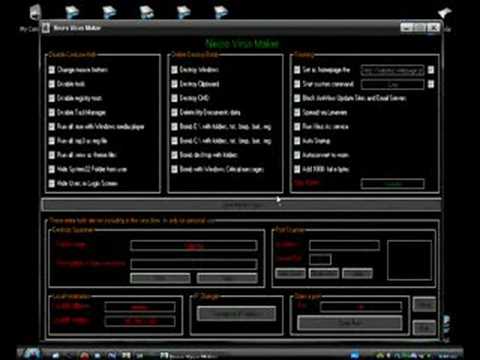
Now after you download and run any of these applications, you will see screens like these:


Terabit Virus Maker


JPS Virus Maker


Necro Virus Maker


2. Now select some of the given options depending on the type of prank you want to play.
3. Now select an Icon for the virus so that it looks real.
4. Select a name for the virus as this new name is being displayed in processes and people can't distinguish normally.

5. Now click on the Make Virus button to create the virus.
6. Now its time to send it to a friend and play some cool pranks on them.
0 comments
Read More

Monday, May 14, 2012

Top Five Screen Capture Apps


Screen capture applications are particular software tools that help to capture what you see on the screen and save them as images. This is a very handy tool for web designers and developers and anybody who wants to capture important information that is displayed on screen. 

Even though Microsoft now bundles their very own screen capture tool called Snipping Tool with Windows, there are a number of third party tools in the market which has so much to offer.

We have compiled a list of the top 5 screen capture applications are that have received good reviews from the users worldwide.

Screen hunter (click here)

Screen hunter is a free application that is very useful for capturing a full screen or an active window. 
The user interface is very simple so operating this software is piece of cake. The users also have the option of selecting a single hot key to take the take the screen capture which makes it convenient for a user. The features and operations are complete hassle free and easy to use. 
However, there is one major drawback as PNG format is not supported. You also need to pay in case you to upgrade to the premium version.

Shotty (click here)

This is a full-featured (free) screen shot taking tool that is used by a lot of people. It has the ability to capture the Aero-Glass effect in Windows 7 and Windows Vista which enables the user to get HQ screenshots. It has a number of useful features like cropping, captioning and inserting text. 
Some users have complained that PNG compression is not good although there are no complaints with the high quality images.


Gadwin printscreen (click here)

This is a flexible screen capture tool that is equipped with sophisticated features, a user-friendly interface and settings that are fully customizable for short keys. There is no built-in image editor which is a real drawback. But this application is compatible with Windows NT 4, Windows 7 and Windows 2003. The application works seamlessly with no hiccups during its operation.

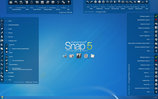
Ashampoo Snap 5 (click here)

Ashampoo Snap 5 is so far my most favourite screen capture tool. It allows the users to make the screen shot of an active screen quite easily. The best feature of this tool is that it allows you making a snapshot of the content and you can upload the result to Facebook. By this way, you will be able to get feedback in the form of comments and likes in quick time. Its updated tools option allows the user to edit and design the screenshots quite easily. 
Moreover, it is easier to make screenshots for presentations, manuals or internet and to capture the menu tree. Its advance recording feature not only records screen-shots but even record movie of your desktop, record the webcam with mic for creating video greetings etc. 
Additionally, it has features like, restructured tool bars for improved workflow, easier accessible configuration options for all tools, improved tools supporting rotation and transparency and watermarking for screenshots and captured videos.

Screenr (click here)

Screenr is different from all the above apps that I've mentioned so far as it works on the cloud. Screenr is a web-based and cool looking screen capture tool having options to add captions and highlight or make a short movie by capturing what is playing on the screen. 

It is a very attractive application but at the same time very simple to use. The major advantage of this tool is the instant sharing capability. You can log in via Twitter or Facebook account and can record anything on your computer screen up to 5 minutes. Morover if you record your screen, the recording can also be downloaded in MP4 format. 
As you can see there are five leading screen capture applications that have its advantages and limitations. The final choice depends on the user. He needs to ask himself why needs particular software and where he wants to apply it.


What Screen Recorder do your use? Let us know in the comment box below.


 Margaret
About the Guest Author:
Margaret is a blogger by profession. She loves writing on environment and technology. Beside this she is fond of books. She recently did an article on ecofriendThese days she is busy in writing an article on gizmowatch.
0 comments
Read More

Wednesday, May 9, 2012

Remove any Virus using Ubuntu

Removing Virus using Ubuntu

Microsoft Windows is supposed to be the most commonly used operating system in every home. The reason behind this can possibly be because of its user friendly interface and the easy installation of various software applications. This eventually results in being prone to frequent virus attacks followed by severe damages to the computer. 

There are certain viruses that tend to corrupt the system files of the Windows. The computer crashes during reboot and tends to auto shut down every time the system restarts. Thus, using Ubuntu is the only solution to remove viruses in such a condition.

Before getting started

It is necessary to detect and diagnose the infection before opting for the Linux therapy. The antivirus programs might be of some help in case of infections. But it is true that the majority of the antivirus programs available in the modern day market are often not capable to detect highly infectious viruses. Some critical attacks might even resist any kind of antivirus software installation to the infected system. So, using Ubuntu can then be the only way to secure the computer.

Why opt for Ubuntu

Ubuntu can be a best friend when all the defensive weaponries to save a Windows fail to offer a perfect shield to the computer system. 

A CD image of Ubuntu is easy to download from the respective website. Ubuntu is free to use and can also be readily downloaded using the bit torrent. A bit torrent download is fast and easy to opt for. Once the CD image is downloaded it can be burnt to a disk for further usage.

Commencing operation

The Ubuntu CD is to be inserted to the infected computer’s ROM drive. Once the Ubuntu CD is inserted the system must to be rebooted. An antivirus software application can now be used to run a thorough scan in order to detect any malicious object hidden around the deepest core of the system files. If any such existence is detected the software can readily get rid of the item and secure the respective file. The user can also locate the existence of weird file sets and shortcuts which might eventually have replicated itself due to the virus attack. Running the Ubuntu can lead to the permanent disposal of such objects from the infected system.

Things to be noted

virus
As the Linux based Ubuntu operating system runs directly from the system memory there will not be any trace of it once the system is secured and restarted. Ubuntu can effectively remove the harmful viruses from a Windows PC but it does not ensure that the system is absolutely secured from further threats and attacks. Windows operating system is always at the verge of massive virus attacks and thus proper security measures must be obtained.

The reason behind Ubuntu’s success is that the virus applications fail to run in a Linux system. On the other hand a virus hides itself in the deepest sectors of a Windows PC and gets undetected. But when the Ubuntu runs on the same system the same virus fails to respond and can then be easily removed using a potential antivirus program. Being an application to run directly from the RAM, Ubuntu is very useful and indeed a friend in need during a massive Windows breakdown.


 Margaret
About the Guest Author:

Margaret is a blogger by profession. She is also very fond of books. She recently wrote articles on most expensive painting and new Swift.
0 comments
Read More

Sunday, May 6, 2012

What is the State Of The Internet

Hi Friends, I have a wonderful discovery for you today ! I just came over this site called OnlineSchools.org.  This website gives some of the coolest info graphics I've see lately on The State of the Internet.


The site consists of a number of cool info graphics on internet statistics like Social Network dominance, Internet Enemies, Qualities Worldwide.


So I recommend every internet freak out there to check it, I bet you will like the fun facts section much.

click below to launch website.


0 comments
Read More

Tuesday, May 1, 2012

How to Spoof Caller ID

Caller ID Spoofing has been on the news for quite sometimes now. While caller ID spoofing is considered illegal at many countries, there may be some 'very high' prank quotient involved in this.

What is Caller ID Spoofing

caller id spoofingSuppose Louis 's girlfriend is Kate. And John (Kate's friend) wants to play a prank on her by calling her from Louis's phone number.
Now this is where caller ID spoofing enters the scene.

By caller ID spoofing you can call to any number and make the call appear like coming from any number you want.

Moreover some online services even offer extra features like call recording and changing voice pitch.

How to Spoof Caller ID

In the past half-a dozen years, hundreds of websites have originated which serve the purpose of Spoofing one's caller ID.

While there are many trial and paid services online like spoofcard.com and spooftel.com, today i'll be telling you the best one among them according to me and it is also very very easy.www.CrazyCall.net is the website i am talking about.
I will show a screen shot of the site which will make it clear.

How it works / How to use CrazyCall

CrazyCall.com is very easy to use. 

Firstly you have to visit the website www.crazycall.net (Isn't this obvious?)

Next, choose your country, enter the number you want to display on the victim's phone and the victim's phone number.

You also get an option to choose your Voice Pitch (changes your voice pitch in real-time.)

And you are done.
Next you will need to call one of the two numbers provided from your phone
(prefer your land phone or maybe your dad's phone as these lines are international numbers) and enter the code you are provided when you are prompted to.

Please share this article with your friends of you liked it. Thanks.
0 comments
Read More
Powered by Blogger.